命令行操作
使用 Kafka 自带脚本完成日常运维操作:Topic 管理与诊断、控制台生产/消费、消费者组查看、进度重置(重放/跳过)、Broker 动态配置、KRaft 集群状态、压测采样。
以下均为 Windows
.bat写法;Linux 换成对应.sh、去掉.\bin\windows\前缀即可。命令语义各版本一致(Kafka 4.x;kafka-configs等已统一走--bootstrap-server,不再用 ZK 直连参数)。
Windows 下请新开一个 cmd 窗口来执行以下命令(不要关闭正在运行 Kafka 的窗口)。
Topic 管理
Topic(主题)用于区分不同类型的业务消息。
创建 Topic
# 语法
.\bin\windows\kafka-topics.bat --create --topic <Topic名称> --bootstrap-server localhost:9092 --partitions <分区数> --replication-factor <副本数>
参数说明:
| 参数 | 含义 |
|---|---|
--topic |
指定 Topic 名称 |
--partitions |
指定分区数(影响并行消费能力) |
--replication-factor |
指定副本数(影响数据可靠性) |
示例:
.\bin\windows\kafka-topics.bat --create --topic my-topic --bootstrap-server localhost:9092 --partitions 1 --replication-factor 1创建成功时显示:Created topic my-topic.
查看已创建的 Topic
# 语法
.\bin\windows\kafka-topics.bat --list --bootstrap-server localhost:9092
参数说明:
--list:列出所有已存在的 Topic
查看 Topic 详情与"带病"分区
# 副本分布:谁当 Leader、ISR 里有谁
.\bin\windows\kafka-topics.bat --describe --topic order --bootstrap-server localhost:9092
# 输出每行一个分区:Leader=2 Replicas=2,3,0 Isr=2,3(ISR 少于副本数即在掉队)

# 运维三板斧之二(之一是没有):
.\bin\windows\kafka-topics.bat --describe --under-replicated-partitions --bootstrap-server localhost:9092   # 副本未追平
.\bin\windows\kafka-topics.bat --describe --unavailable-partitions --bootstrap-server localhost:9092       # 没有可用 Leader
修改 Topic 配置与分区数
# 压缩/清理策略(机制见 11 章)
kafka-topics.bat --alter --topic user-profile --bootstrap-server localhost:9092 \
  --config cleanup.policy=compact

# 增加分区:只能加不能减,且会打乱同 Key 顺序(09 章事故一,三思)
kafka-topics.bat --alter --topic order --bootstrap-server localhost:9092 --partitions 8
设置 Topic 消息保留时间
kafka-configs.bat --bootstrap-server localhost:9092 --entity-type topics --entity-name my-topic --alter --add-config retention.ms=10000参数说明:
| 参数 | 含义 |
|---|---|
--entity-type |
配置类型(此处为 topics) |
--entity-name |
对应的实体名称 |
--alter |
表示修改已有配置 |
--add-config |
添加/修改配置项 |
成功显示:Completed updating config for topic my-topic.
删除 Topic
kafka-topics.bat --bootstrap-server localhost:9092 --delete --topic my-topic删除成功后显示空行(无报错即为成功)。
生产与消费
生产消息
新开一个 cmd 窗口:
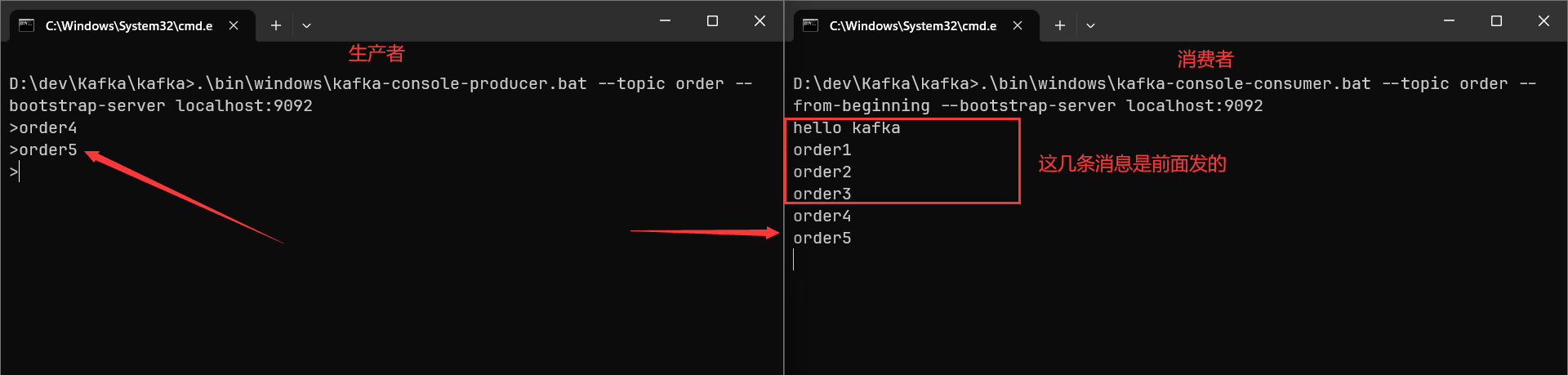
.\bin\windows\kafka-console-producer.bat --topic order --bootstrap-server localhost:9092进入交互模式后,输入任意内容并按回车即可发送一条消息。按 Ctrl+C 退出。
消费消息
.\bin\windows\kafka-console-consumer.bat --topic order --from-beginning --bootstrap-server localhost:9092参数说明:
| 参数 | 含义 |
|---|---|
--topic |
指定要订阅的 Topic 名称 |
--from-beginning |
从最早的消息开始读取。如果不加此参数,则默认从上次的 Offset 处开始读取(Offset 由 Kafka 维护) |
--partition |
指定从哪个分区读取 |
--offset |
指定从第几条消息开始读取 |
--group |
指定消费者组 |
消费者组
不需要事先手动创建消费者组——直接在消费命令中通过 --group 指定即可自动创建。
.\bin\windows\kafka-console-consumer.bat --topic order --from-beginning --group testgroup --bootstrap-server localhost:9092核心规则:
- 同一消费者组内的多个消费者共同消费一个 Topic,每条消息只会被组内的一个消费者处理(竞争消费)
- 如果需要多个应用同时消费同一 Topic 的全量消息,需要为每个应用创建不同的消费者组
- 每个消费者组会独立维护自己的 Offset(消费进度)
查看消费者组信息
.\bin\windows\kafka-consumer-groups.bat --bootstrap-server localhost:9092 --describe --group testgroup输出每行一个分区:TOPIC PARTITION CURRENT-OFFSET LOG-END-OFFSET LAG——当前进度、分区最新位置、两者差即积压条数。组列表:
.\bin\windows\kafka-consumer-groups.bat --bootstrap-server localhost:9092 --list
# 查所有内部/消费组状态:--all-groups --describe ;MEMBER-HOST 列能看出实例部署在哪
查询分区 Offset 边界(按时间定位)
# -1 = 各分区最新位置(LEO);-2 = 最早;也可给毫秒时间戳
.\bin\windows\kafka-get-offsets.bat --bootstrap-server localhost:9092 --topic order --time -1
LOG-END-OFFSET 减 CURRENT-OFFSET 是 Lag;两次执行 --time -1 的差值就是这段时间该分区的真实写入速率——容量估算(09 章)最便宜的采样手段。
重置与删除组进度
# 重置:回到 earliest / 指定时间(重放)/ 跳过积压。不加 --execute 是干跑预览
.\bin\windows\kafka-consumer-groups.bat --bootstrap-server localhost:9092 \
  --group testgroup --topic order --reset-offsets --to-earliest
# 常见档位:--to-earliest --to-latest --to-datetime 2026-10-13T00:00:00.000Z \
#          --by-duration PT1H(回退一小时)--shift-by -1000(回退一千条)
# 确认后追加 --execute 真正执行

# 删除指定分区的进度记录(组下线清理用;同样要求组内无活跃消费者)
.\bin\windows\kafka-consumer-groups.bat --bootstrap-server localhost:9092 \
  --group testgroup --topic order:0 --delete-offsets

# 前提:--reset-offsets/--delete-offsets 都要求组内没有活跃消费者(先停应用),否则直接报错拒绝注意:
--reset-offsets是唯一能"篡改历史进度"的日常命令,重放会真实重跑全部业务副作用——先确认消费端幂等(08 章)再动手。
集群
Kafka 4.0 起仅支持 KRaft 模式,ZooKeeper 相关命令已从发行包里删除;3.x 存量集群的 ZK 运维不再展开。
动态修改 Broker 配置
大部分 Broker 参数支持热更新(--entity-default 改全局,--entity-name <id> 改单台):
# 查看全部动态可改项清单:--describe 不带 --add-config 即展示当前值
.\bin\windows\kafka-configs.bat --bootstrap-server localhost:9092 \
  --entity-type brokers --entity-default --describe

# 例:临时调低日志保留 + 打开脏选举开关(演示"知道自己在干嘛"再改)
.\bin\windows\kafka-configs.bat --bootstrap-server localhost:9092 \
  --entity-type brokers --entity-default --alter \
  --add-config log.retention.hours=72,unclean.leader.election.enable=false
标注 Static 的参数(log.dirs、num.network.threads、controller.quorum.* 等)改不动,要改配置+重启。删除动态覆盖值用 --delete-config。
控制器组状态(KRaft 专属)
.\bin\windows\kafka-metadata-quorum.bat --bootstrap-server localhost:9092 describe --status
# 关注:LeaderId and Epoch、HighWatermark 是否在推进、各 voter 的 Lag(动态 quorum 增删控制器后用这个确认)

.\bin\windows\kafka-metadata-quorum.bat --bootstrap-server localhost:9092 describe --replication
特性版本(决定新 API 是否可用,升级流程见 12 章):
.\bin\windows\kafka-features.bat --bootstrap-server localhost:9092 describe手动 Leader 迁移
# 首选 Leader(副本列表第一位)回归,平衡 Leader 分布(12 章)
.\bin\windows\kafka-leader-election.bat --bootstrap-server localhost:9092 \
  --election-type preferred --topic order --partition 0
压测与容量采样
上线前用官方压测工具拿真实数字(分区数估算见 09 章):
# 生产压测:每条 1KB,目标总速率 50 万条/秒,带 Key 模板(%g = 递增计数器)
.\bin\windows\kafka-producer-perf-test.bat --topic perf-order \
  --num-records 150000000 --record-size 1024 --throughput 500000 \
  --key-format "order-%g" --key-count 100000 \
  --producer-props bootstrap.servers=localhost:9092 acks=-1 \
  compression.type=zstd linger.ms=20 batch.size=65536

# 消费压测:新组从头读,打印分区延迟直方图
.\bin\windows\kafka-consumer-perf-test.bat --topic perf-order --group perf-cg \
  --bootstrap-server localhost:9092 --offset earliest --messages 150000000 --print-metrics
producer-perf-test 输出末行的 records/sec 就是该配置组合下的集群写入上限;consumer-perf-test 的 MB/sec + 延迟分位数用来定"能否追平"。